React.dev 阅读笔记
React 官方文档的详细阅读笔记,包含 useEffect、state 管理等
- [[#Batch Update]]
- [[#Don’t mirror props in state]]
- [[#preserving-and-resetting-state]]
- [[#To change the dependencies, change the code]]
- [[#Separating Events from Effects]]
- [[#Limitations of Effect Events]]
- [[#removing-effect-dependencies]]
多读多思考,温故而知新, 重新学习react
Learning篇章
-
官方推荐使用function component
-
官方在第一节就对key做了详细的解释
Notice how
<li>has akeyattribute. For each item in a list, you should pass a string or a number that uniquely identifies that item among its siblings. Usually, a key should be coming from your data, such as a database ID. React uses your keys to know what happened if you later insert, delete, or reorder the items.
- 官方例子中对<></> fragment的使用很看重,有种最佳实践的味道
- 官方例子中,出乎我意外的,使用了箭头函数,作为onclick的传参
- on和handle的官方推荐命名
In React, it’s conventional to use
onSomethingnames for props which represent events andhandleSomethingfor the function definitions which handle those events.
- 意外的immutability,在例子中使用了slice,是因为只有slice复制数组才可以触发比较
给出的解释是这个
There is also another benefit of immutability. By default, all child components re-render automatically when the state of a parent component changes. This includes even the child components that weren’t affected by the change. Although re-rendering is not by itself noticeable to the user (you shouldn’t actively try to avoid it!), you might want to skip re-rendering a part of the tree that clearly wasn’t affected by it for performance reasons. Immutability makes it very cheap for components to compare whether their data has changed or not. You can learn more about how React chooses when to re-render a component in the
memoAPI reference.
-
其实这里可以看出,是追求immutablity的优点,或者换个想法,是javascript语言本身的问题,导致这个地方必须这样解决。
-
进一步解释了动态list的Key的问题
It’s strongly recommended that you assign proper keys whenever you build dynamic lists. If you don’t have an appropriate key, you may want to consider restructuring your data so that you do.
If no key is specified, React will report an error and use the array index as a key by default. Using the array index as a key is problematic when trying to re-order a list’s items or inserting/removing list items. Explicitly passing
key={i}silences the error but has the same problems as array indices and is not recommended in most cases.Keys do not need to be globally unique; they only need to be unique between components and their siblings.
Thinking in React
-
这个例子非常好,跟weekly那边的很多思路是很一致的。
-
用我的描述来说:就是永远的帧组件,从帧组件开始实现。数据最终也只是里面的一帧。
-
react-devtools有命令行启动的服务版本,我才知道。不过这个其实就是跟插件的原理一致的。
这边在&&的推荐语法中,提到了这个左侧0的问题。因为这个语法,除非是特别明显简单的场景,会这样写,其他情况都需要做前置处理。
- 关于这个左侧number可能为0的问题,不知道有没有对应的rule规则能避免,但是要先识别到ts类型
Pitfall
Don’t put numbers on the left side of
**&&**.To test the condition, JavaScript converts the left side to a boolean automatically. However, if the left side is
0, then the whole expression gets that value (0), and React will happily render0rather than nothing.For example, a common mistake is to write code like
messageCount && <p>New messages</p>. It’s easy to assume that it renders nothing whenmessageCountis0, but it really renders the0itself!To fix it, make the left side a boolean:
messageCount > 0 && <p>New messages</p>.
再次提到key的问题
使用key的原则
- Keys must be unique among siblings. However, it’s okay to use the same keys for JSX nodes in different arrays.
- Keys must not change or that defeats their purpose! Don’t generate them while rendering.
突然发现之前的我用uuid生成key的方式好蠢,不过其实也是对的。当时是给数据源datasource手动增加id。。
再次提到**Purity,**提到了纯函数(没有副作用,幂等)
并强调声明了一点:
React is designed around this concept. React assumes that every component you write is a pure function. This means that React components you write must always return the same JSX given the same inputs:
- recipes这个比喻我很喜欢
In React, side effects usually belong inside event handlers. Event handlers are functions that React runs when you perform some action—for example, when you click a button. Even though event handlers are defined inside your component, they don’t run during rendering! So event handlers don’t need to be pure.
If you’ve exhausted all other options and can’t find the right event handler for your side effect, you can still attach it to your returned JSX with a
useEffectcall in your component. This tells React to execute it later, after rendering, when side effects are allowed. However, this approach should be your last resort.
- recipes的例子还接上了新的故事
Imagine that your components are cooks in the kitchen, assembling tasty dishes from ingredients. In this scenario, React is the waiter who puts in requests from customers and brings them their orders. This process of requesting and serving UI has three steps:
- Triggering a render (delivering the diner’s order to the kitchen)
- Rendering the component (preparing the order in the kitchen)
- Committing to the DOM (placing the order on the table)
客人trigger,需要按recipe做新render。做完之后commit到dom
- 这也是一个很好的例子,明确帧是合并更新的逻辑:Queueing a series of state updates
- 官方例子推荐了use-immer,原因给的并不是性能,而是:If copying arrays in code gets tedious, you can use a library like Immer to reduce repetitive code:
箭头函数给出了建议解决
Rather than executing the code inside with every render, this creates a function to be called later.
In both cases, what you want to pass is a function:
<button onClick={handleClick}>passes thehandleClickfunction.<button onClick={() => alert('...')}>passes the() => alert('...')function.
- 事件冒泡还有例外,我是刚知道
All events propagate in React except
onScroll, which only works on the JSX tag you attach it to.
Hook的第一次介绍,给出了使用规则
Hooks—functions starting with
**use**—can only be called at the top level of your components or your own Hooks. You can’t call Hooks inside conditions, loops, or other nested functions. Hooks are functions, but it’s helpful to think of them as unconditional declarations about your component’s needs. You “use” React features at the top of your component similar to how you “import” modules at the top of your file.
介绍ReRender
There are two reasons for a component to render:
- It’s the component’s initial render.
- The component’s (or one of its ancestors’) state has been updated.
这里的ancestor还是比较关键的
然后state的理解也比较关键
再次提醒Render纯函数
这里也是大家对ReRender过分注意,忽略的性能的根本:注意Render跟commit to Dom是两回事
当然我们常说的ReRender,本身就是包含commit to Dom的影响在内的。
- 也就是你不memo组件,如果本身他commit to dom没有影响,带来的性能提升,可能不如memo本身带来的开销。
简单提到了后面,浏览器的重绘
帧Hook的问题:
- 提到了使用替换法
- 这确实是一个很好的办法,要从上面的根本去理解这个方法,要重新思考这个,纯函数的含义。一切都是纯函数
A state variable’s value never changes within a render, even if its event handler’s code is asynchronous. Inside that render’s
onClick, the value ofnumbercontinues to be0even aftersetNumber(number + 5)was called. Its value was “fixed” when React “took the snapshot” of the UI by calling your component.
Batch Update
主要指怎么合并更新。
这里给了很多例子,但是都是帧的例子,这里的关键点是:什么算是同一帧。
之前React的逻辑是,尽可能算。React18中给出了官方API来手动控制这个事情。
这里的新手指导文档是这样说的:
After the event handler completes, React will trigger a re-render. During the re-render, React will process the queue. Updater functions run during rendering, so updater functions must be pure and only return the result. Don’t try to set state from inside of them or run other side effects. In Strict Mode, React will run each updater function twice (but discard the second result) to help you find mistakes.
给了一个挺好的例子,有点出乎我的意料
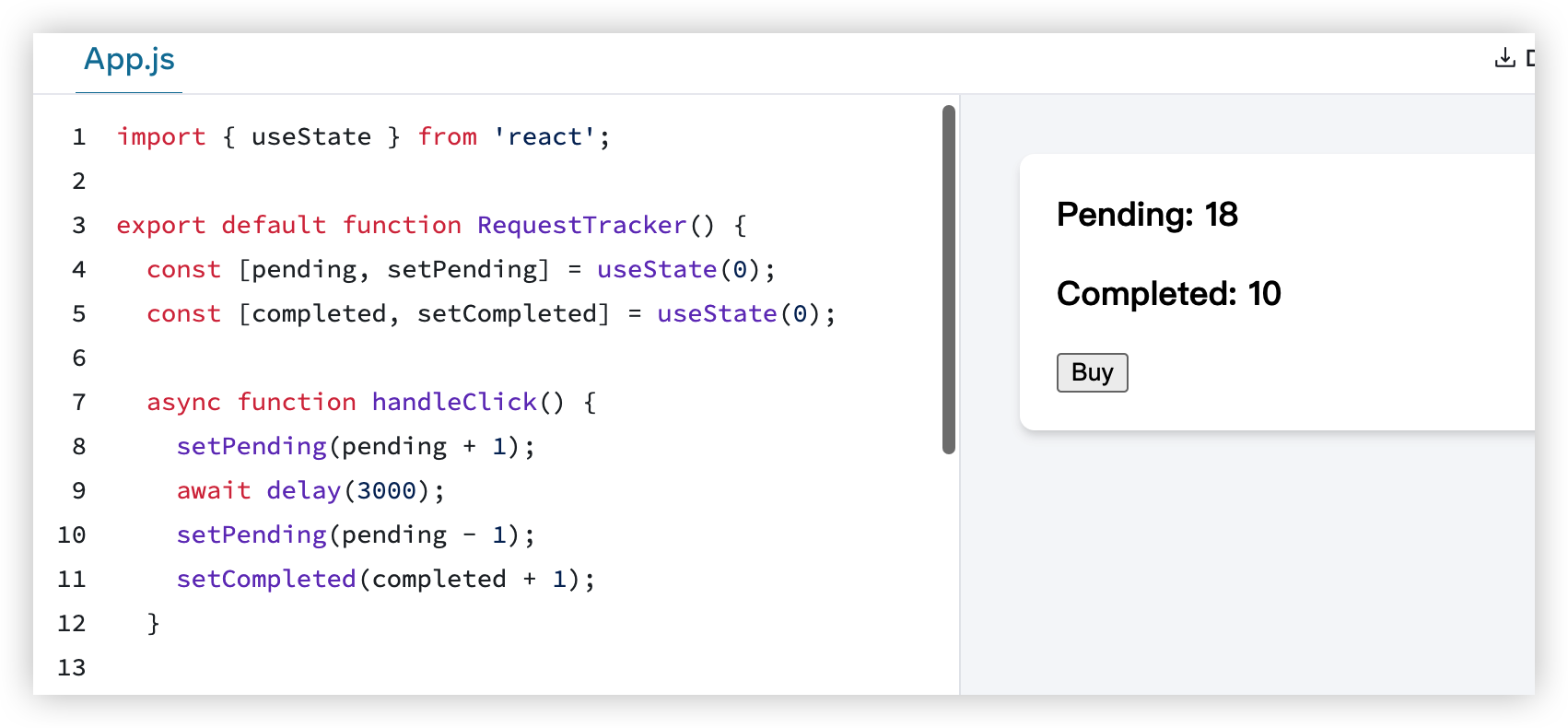
- 然后是mutation的问题
This code modifies the object assigned to
positionfrom the previous render. But without using the state setting function, React has no idea that object has changed. So React does not do anything in response. It’s like trying to change the order after you’ve already eaten the meal. While mutating state can work in some cases, we don’t recommend it. You should treat the state value you have access to in a render as read-only.To actually trigger a re-render in this case, create a new object and pass it to the state setting function:
我觉得这里的关键词是:React has no idea that object has changed.
这本质是js语言的问题,所以不要过多在意这个。
给出使用immer的理由是:concise
- useReducer
给出的理由也是concise
- Principle for structuring state
这里的原则写的没啥用,避免冗余,冲突,重复,嵌套,这种原则在任何代码设计上都应该极力避免,而跟state没有关系。
- 不过后面的例子挺好的
第一个例子
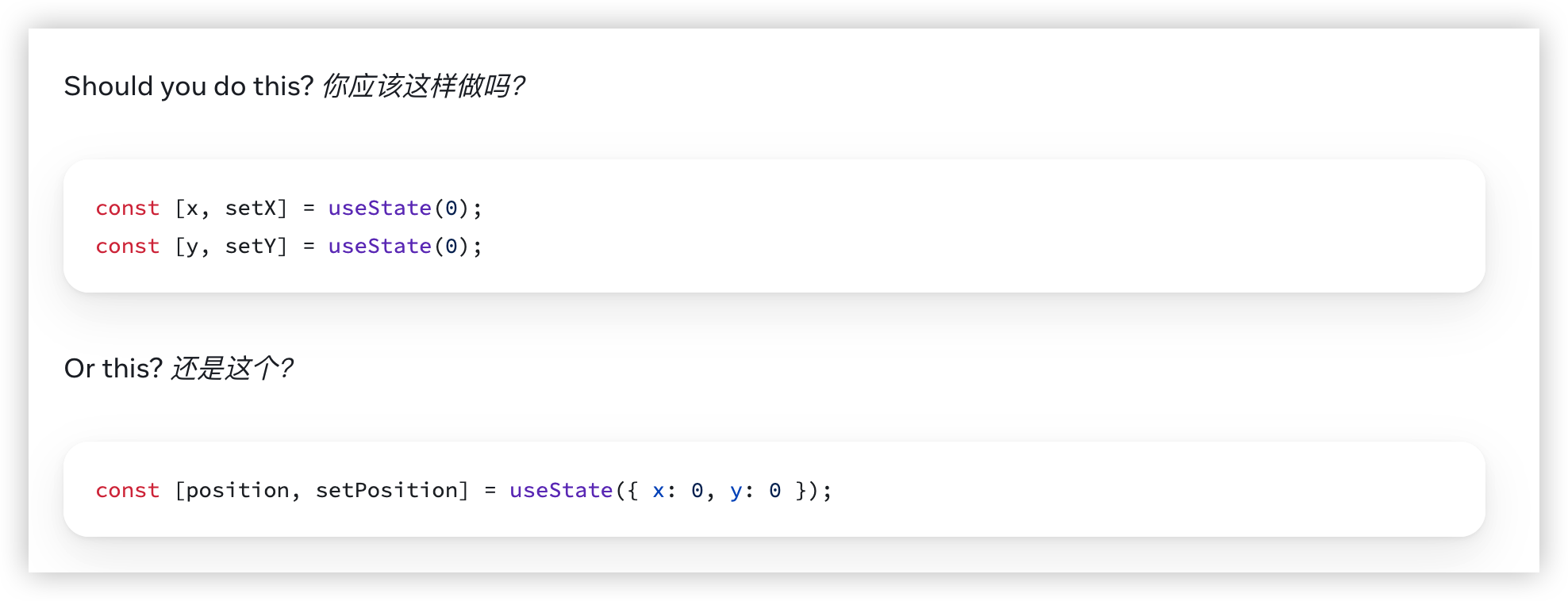
- 如果两个变量总是同时变化,统一成一个状态变量是一个好主意?
这里我持否定观点。原因是虽然他们是同时变化(生产/改变端。但是在最终消费端,是不一定同时使用的。
但话又说回来,如果他们一定是同时改变的,在最终消费端,就大概率会被合入到同一个Render帧里面。
所以更确切的说法是,如果两个变量总是同时改变,同时影响的Component状态是一致的,就应该统一成一个变量。
第二个例子Avoid contradictions in state
这是一个新手,或者说新增修改需求后,特别容易出现的一种情况。
多种if判断,导致状态机出现不可能状态
解决这个问题就是重新梳理业务状态机,收敛成单一路径状态。
Don’t mirror props in state
这个是一个经典受控属性处理的问题,很高兴这里提了这个问题。
这里简单的给出了终极解决方案:如果Don’t mirror
- 其实在绝大多数情况下,都应该don’t mirror
- 一些通用表单组件设计,不得不这样做
- 在一些类似需要“save/apply”的储存的场景下,还是需要做这个能力的,这时候就会用effect来处理这个mirror props同步的问题。也引出很多onchange循环的问题。这个就另外讨论了
第三个例子Avoid duplication in state
- 纯粹的数据结构的例子问题
第四个例子Avoid deeply nested state
- 这是菜单树容易出现的问题。
- 一般情况下不太好处理,只能尽可能拍平成1-2层,用Unique-key标识,大部分业务场景下也够用。
Sometimes, you can also reduce state nesting by moving some of the nested state into the child components. This works well for ephemeral UI state that doesn’t need to be stored, like whether an item is hovered.
- 上面提到了另外一种拍平的想法:就是要分清什么是需要变化的状态。例如如果是选中或者hover,其实有可能收敛成子组件的状态
提到了一个重要的原则:Single source of truth
就是state,props的流向,保证单向性,即使是一个圈,也应该保证单向流动。
preserving-and-resetting-state
https://react.dev/learn/preserving-and-resetting-state
这个例子让我有点吃惊,我回头测一下是不是react18才有的特性
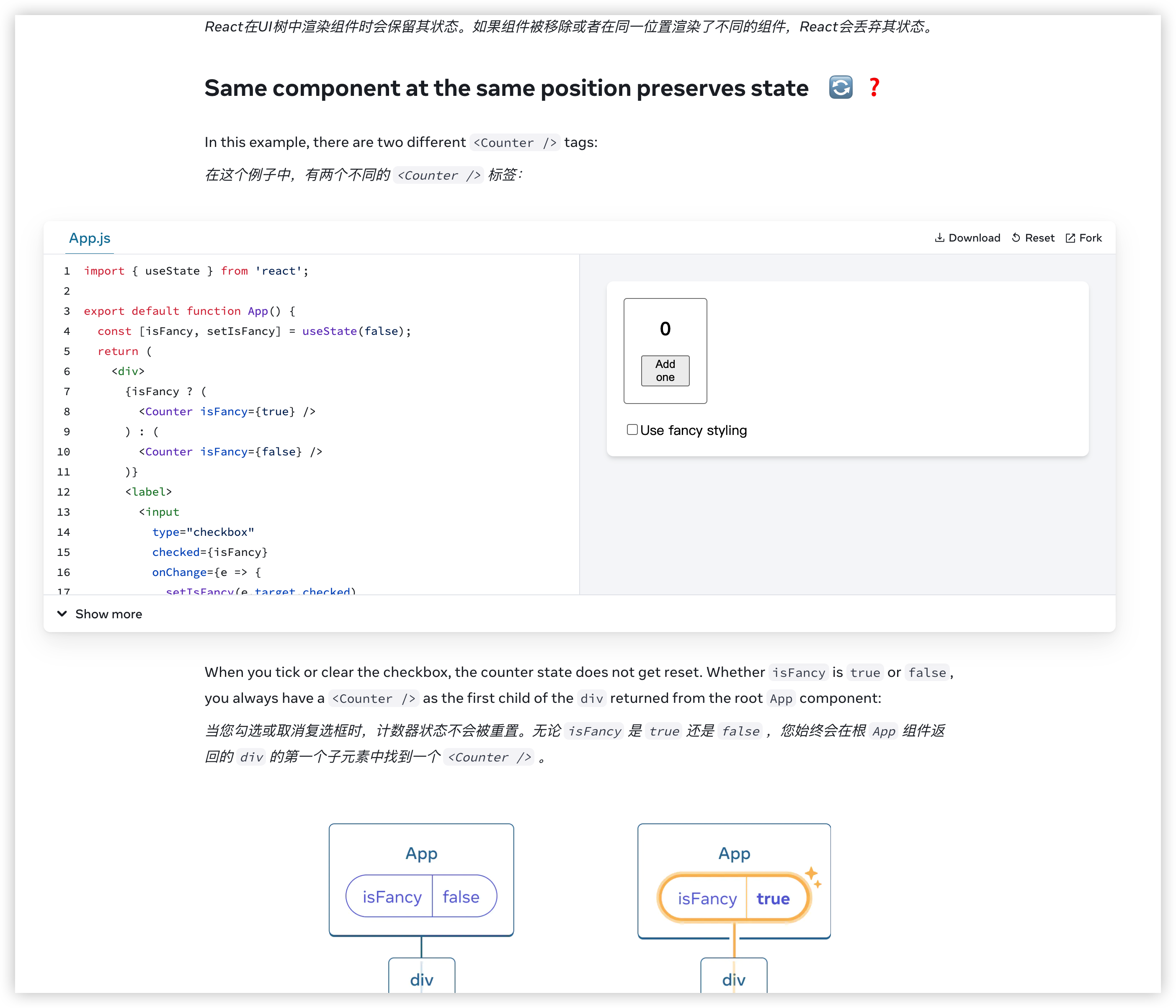
- 正常写代码的情况是
<Counter isFancy={isFancy} />
- 这种情况一定是同一个组件,但是react似乎将上面例子代码的情况。他将在根组件中去对比寻找。不知道会通过什么方式去匹配Key是一致的。
但如果我们手动声明key后,就马上回到我认知的情况了
{isFancy ? (
        <Counter key="fancyKey" isFancy={true} />
      ) : (
        <Counter isFancy={false} />
      )}
在Pitfall中这个现象更为明显,也更为隐蔽
-
这里提到的UI树,应该就是fiber树的概念了吧
-
不同位置的隐蔽例子
{isFancy ? (
        <div>
          <Counter isFancy={true} />
        </div>
      ) : (
        <section>
          <Counter isFancy={false} />
        </section>
      )}
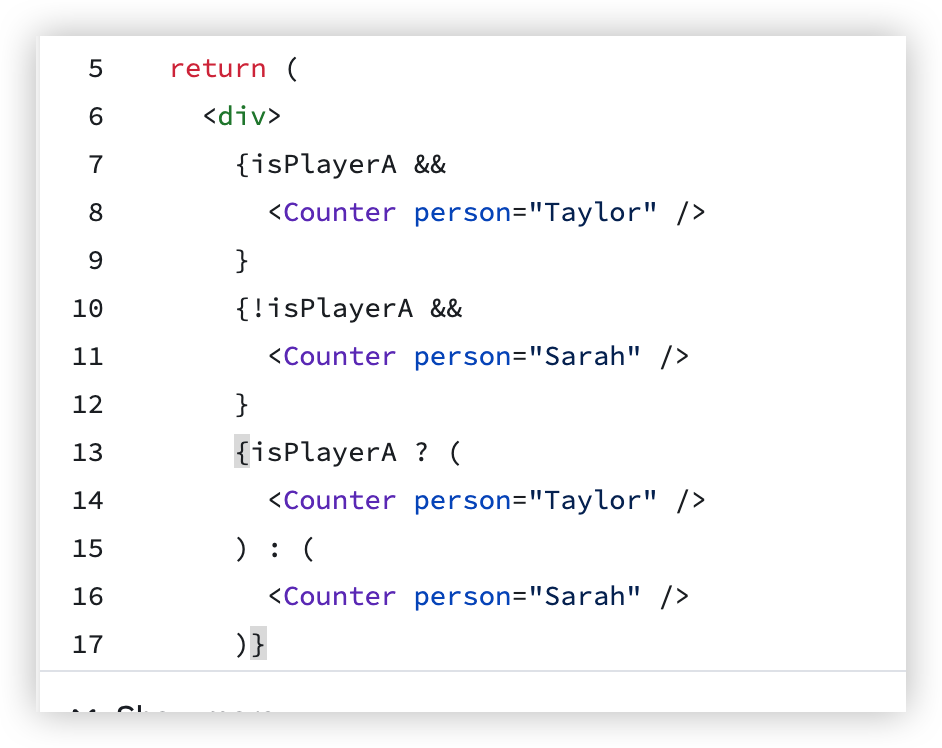
这个是真的隐蔽
震惊我一整年,完全没看出
也就是上面的认知:?是算一个的,&&是算两个组件的
又在传销官方Effect概念了
- 明确了effect处理的职责
这边我看到了官方给的原则和错误例子
这些错误代码让人感觉亲切
- 例子:Updating state based on props or state
function Form() {
  const [firstName, setFirstName] = useState('Taylor');
  const [lastName, setLastName] = useState('Swift');

  // 🔴 Avoid: redundant state and unnecessary Effect
  const [fullName, setFullName] = useState('');
  useEffect(() => {
    setFullName(firstName + ' ' + lastName);
  }, [firstName, lastName]);
  // ...
}
- 例子:Resetting all state when a prop changes
export default function ProfilePage({ userId }) {
  const [comment, setComment] = useState('');

  // 🔴 Avoid: Resetting state on prop change in an Effect
  useEffect(() => {
    setComment('');
  }, [userId]);
  // ...
}
例子是新手典型的例子,也是vue写多了,过来写React的一种后遗症
这种是一种类似 watch/listener变化的写法
问题是:
- 监听变化的事件触发线是不确定的。这种代码在复杂度提升后,会带来很多意外的变化提升,尤其当依赖变多之后。属于排查问题的一大顽疾
- 同时不利于扩展,添加新逻辑,比如完整思考旧逻辑的整个UseEffect触发的可能性,会不会引起什么情况。
- 这两个问题的反面就是,代码逻辑可读性也很差。
这个第二个例子的解决方案往往不容易,需要从设计层面去反向思考整个问题。
但是往往在实际开发的时候,由于可能只是一个bugfix,会强行加上一个这样的补丁
官方这里的例子给的有点让人感觉过于理想,但是也侧面说明,其实userId的变化,对于业务的语义就是重置,那为什么不让react来接管呢?
- 当然你应该说,这个才是组件状态数据的思考方式,就应该用key去考虑到这个情况
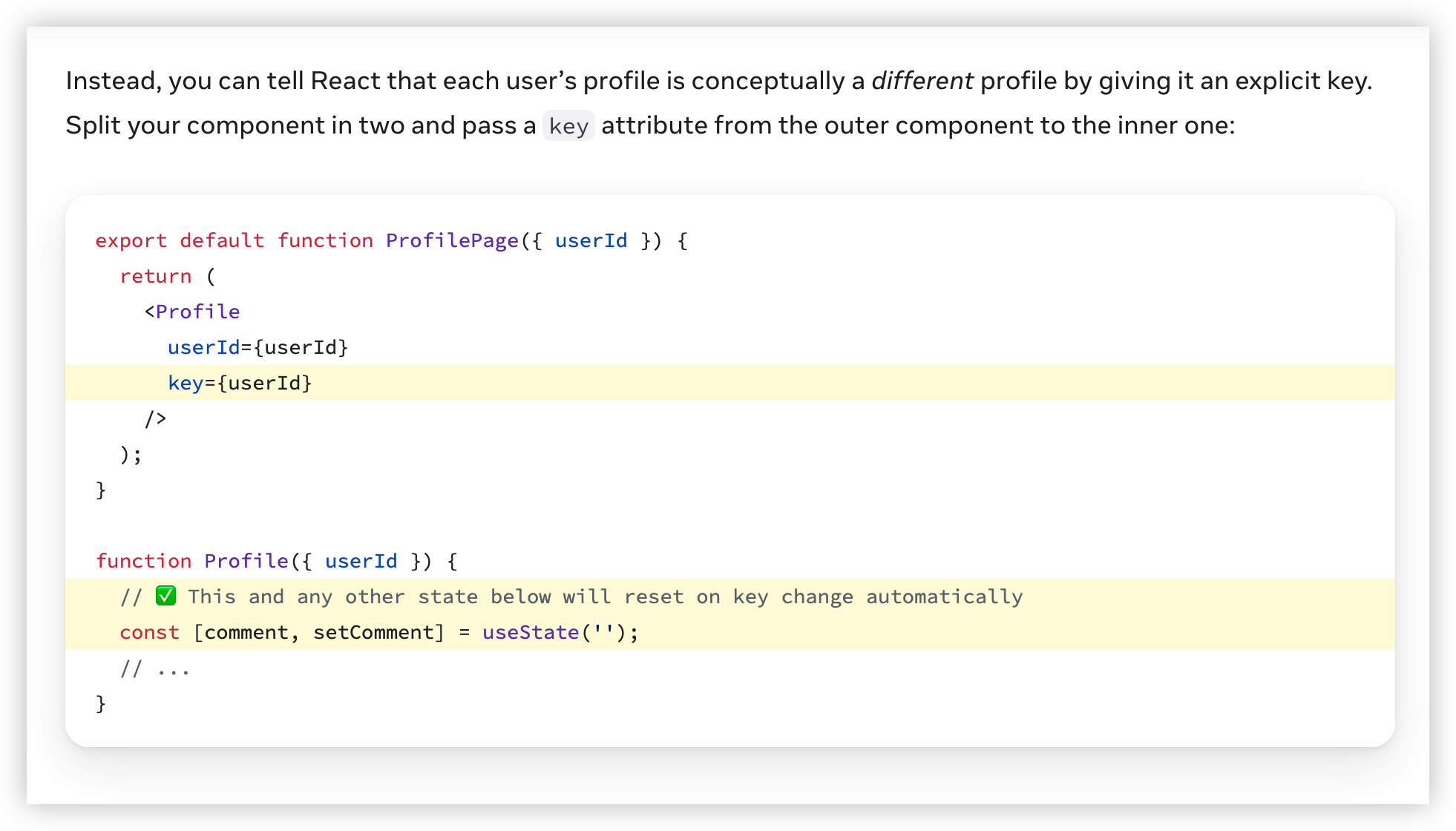
确实马上就给解答了我的疑问;更多情况下,并不是所有的state都需要重置
例子:Adjusting some state when a prop changes
function List({ items }) {
  const [isReverse, setIsReverse] = useState(false);
  const [selection, setSelection] = useState(null);

  // 🔴 Avoid: Adjusting state on prop change in an Effect
  useEffect(() => {
    setSelection(null);
  }, [items]);
  // ...
}
这个方式是我没想到的
function List({ items }) {
  const [isReverse, setIsReverse] = useState(false);
  const [selection, setSelection] = useState(null);

  // Better: Adjust the state while rendering
  const [prevItems, setPrevItems] = useState(items);
  if (items !== prevItems) {
    setPrevItems(items);
    setSelection(null);
  }
  // ...
}
- 因为”原则“告诉我,不应该在render中写这部分代码。到那时如果你从出发点去想,这个setSelection的动机, 就应该合并到这个render里面。在这个例子里面prevItems可以用ref
function List({ items }) {
  const [isReverse, setIsReverse] = useState(false);
  const [selectedId, setSelectedId] = useState(null);
  // ✅ Best: Calculate everything during rendering
  const selection = items.find(item => item.id === selectedId) ?? null;
  // ...
}
- 例子:Event-specific logic 特定事件的逻辑不应该在effect里面
function Form() {
  const [firstName, setFirstName] = useState('');
  const [lastName, setLastName] = useState('');

  // ✅ Good: This logic should run because the component was displayed
  useEffect(() => {
    post('/analytics/event', { eventName: 'visit_form' });
  }, []);

  // 🔴 Avoid: Event-specific logic inside an Effect
  const [jsonToSubmit, setJsonToSubmit] = useState(null);
  useEffect(() => {
    if (jsonToSubmit !== null) {
      post('/api/register', jsonToSubmit);
    }
  }, [jsonToSubmit]);

  function handleSubmit(e) {
    e.preventDefault();
    setJsonToSubmit({ firstName, lastName });
  }
  // ...
}
这个例子更是生产常见。
带来的问题就是简单的空转if的effect
其实这里的原则很明显,就是不在effect做业务逻辑判断。
- 例子:Chains of computations
这就是汇总了上面的问题了,也是我一开始讲的watch的问题
说起来我之前在没有看过的情况下,根据生产的经验,也归纳出类似的经验,也算是一种小成就呢。
- 例子:Initializing the application
function App() {
  // 🔴 Avoid: Effects with logic that should only ever run once
  useEffect(() => {
    loadDataFromLocalStorage();
    checkAuthToken();
  }, []);
  // ...
}
这里提到了dev环境有可能会Mount多次
原因我没理解具体指的什么,可能是热更新的问题吧
但这里的核心观点是:思考effect执行的逻辑和时机,是否和你的预期语义一致
这里其实侧面反应了:useEffect这个API设计的失败。因为你既不能用生命周期去思考,也不能用事件监听去思考。只能用非常虚幻的”处理副作用“去思考。这很违背开发业务时一般的思考原则,导致用起来非常蹩脚和变扭。
在我这的生产实践中,倾向于完全抛弃useEffect,使用已经封装好的hook代替原有的语义,去减少类似语义化的问题。
这里是另外一套逻辑原则
我们可以细细读一下
To change the dependencies, change the code
You might have noticed a pattern in your workflow:
- First, you change the code of your Effect or how your reactive values are declared.
- Then, you follow the linter and adjust the dependencies to match the code you have changed.
- If you’re not happy with the list of dependencies, you go back to the first step (and change the code again).
The last part is important. If you want to change the dependencies, change the surrounding code first. You can think of the dependency list as a list of all the reactive values used by your Effect’s code. You don’t choose what to put on that list. The list describes your code. To change the dependency list, change the code.
This might feel like solving an equation. You might start with a goal (for example, to remove a dependency), and you need to “find” the code matching that goal. Not everyone finds solving equations fun, and the same thing could be said about writing Effects! Luckily, there is a list of common recipes that you can try below.
这就是在耍赖,这也是deps的恶心的地方。你不写deps,帧检查的值就是错的,因为你代码本身依赖这个值。
你写的deps。又等于你新增了一种”watch”值的触发方式。
你需要开始
对于effect处理事件,以及生命周期的理解
官方着重强调了不应该关注组件的生命周期,而应该是effect的处理同步生命周期。
Instead, always focus on a single start/stop cycle at a time. It shouldn’t matter whether a component is mounting, updating, or unmounting. All you need to do is to describe how to start synchronization and how to stop it. If you do it well, your Effect will be resilient to being started and stopped as many times as it’s needed.
提一下这个react文档的一些精妙的地方:就是章节之间会互相引用,达到互相巩固的效果(至少在我这里是这样的,也是因为我这边是温故,会更关注这些细节)
接上面的思考逻辑
就是每个effect本身的逻辑应该独立自洽,而不是当成一个mounted的listener
- 但是实际生产中,组件生命周期的逻辑更容易理解和使用

事实上这种思维是比较重要的,在复杂的effect设计中:
Each Effect in your code should represent a separate and independent synchronization process.
另外由于这种做法并不是很“通用”,一般我会加上对应的注释,或者直接使用customHook命名,表明这个单独effect存在的意义。
- 这里除了语义更好的原因,还有带来更好的维护价值。在新增, 修改的时候 ,目标更明确:而不是在“生命周期”里修改,由于这种帧的不确定性,如果进行修改,非常容易造成bug
这样理解:
- effect是处理deps引起的副作用,会更符合原先的设计思路
- 或者你理解原来纯函数的思路,effect是阻止纯函数的部分。
进一步强调deps的作用,以及为什么不该忽略:
You can’t “choose” your dependencies. Your dependencies must include every reactive value you read in the Effect. The linter enforces this. Sometimes this may lead to problems like infinite loops and to your Effect re-synchronizing too often. Don’t fix these problems by suppressing the linter!
这里给了一个很官方的解释的章节
Separating Events from Effects
- 我还是想再说,这个就是原来的设计,违背了长期的生产实践,导致一种理想和现实的冲突。
在生产实践中:我更愿意使用封装好的类似updateEffect去做这种事情。一方面语义会更清晰,针对的逻辑也更清楚。
- 事实上这里强调的更多,就越说明“正常”的写法很容易出问题
大部分漏掉的依赖是function带来的依赖
对于useEffect来说,比较噩梦的是useCallBack。如果effect deps了useCallBack,很可能会带来一系列链式依赖触发,导致问题非常难排查。
我的意见而言:还是回到原来的两个论点:
- 不要使用useEffect,如果使用,应该遵循useCustomHook这个级别的拆分逻辑。
- 不要在useEffect中依赖过多deps,一般不超过3个,不要依赖useCallback的函数,如果需要调用useCallback封装函数,你需要重新考虑这里的函数的作用,以及是否应该拆分复用。
- 这种情况会占非常多:我们需要在useEffect中调用函数,这个函数依赖帧的最新值,**但是这个帧变化不应该触发useEffect。**一般情况实践中:我们不会使用useCallBack去做
- 亦或者这样说:就是大部分情况下,我们不需要useCallback。这几个API的原始设计,在针对一些比较业务实际的场景下,是混乱而无序的。
没想到React这文档也是跟着我上面这个思路的
介绍了一个新API:useEffectEvent
这个API其实就是希望解决上面我说的无序的盲点
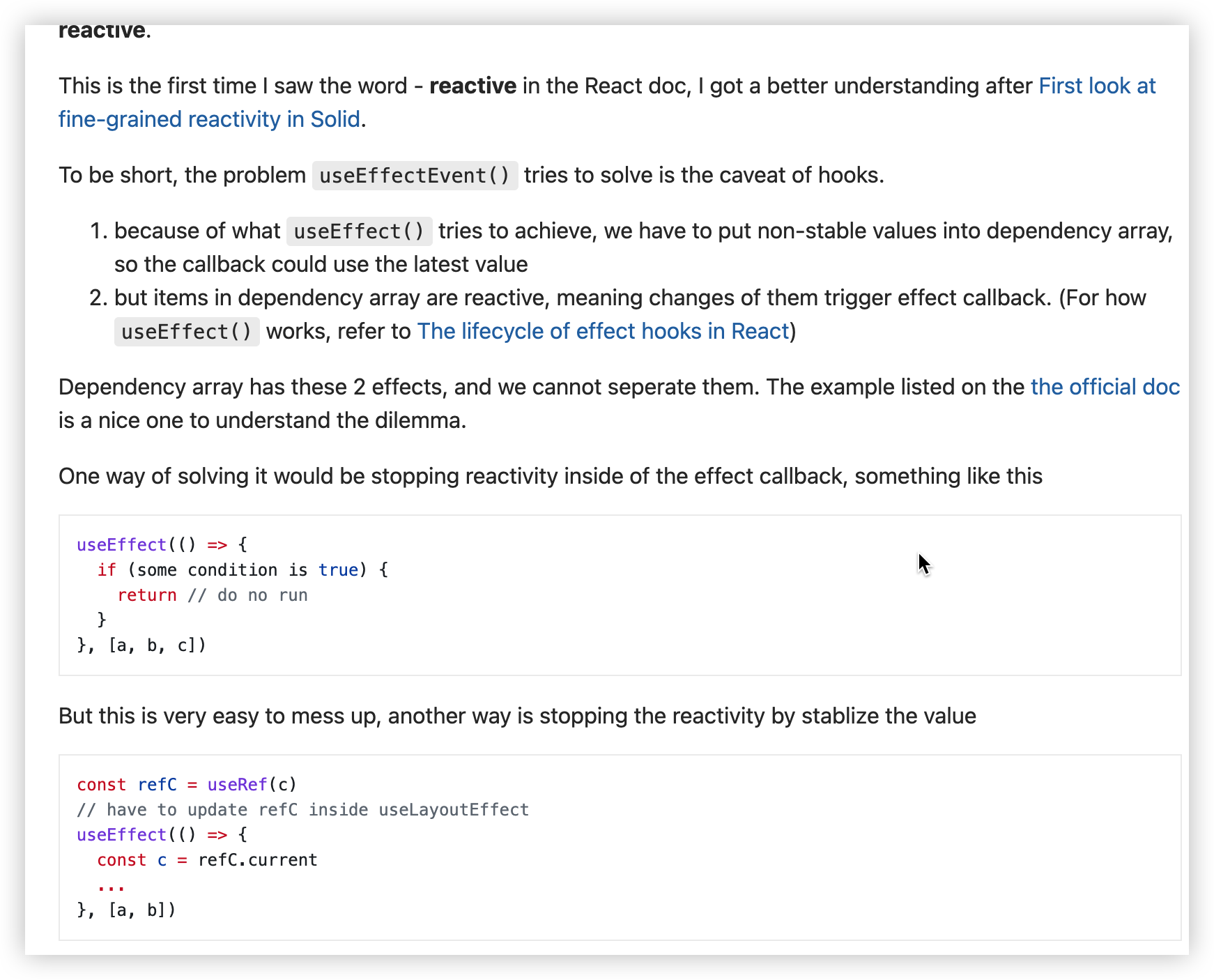
这函数的介绍里面也提到, very esay to mess up。这种写法违背了上面一开始一提到的拆分原则,强行使用if语句去规避deps副作用,而只是想要最新值。
简单来说实现方式:就是返回一个引用一致的闭包函数,通过this去指向每一帧同步的ref函数
这个例子给了很好的使用解释:
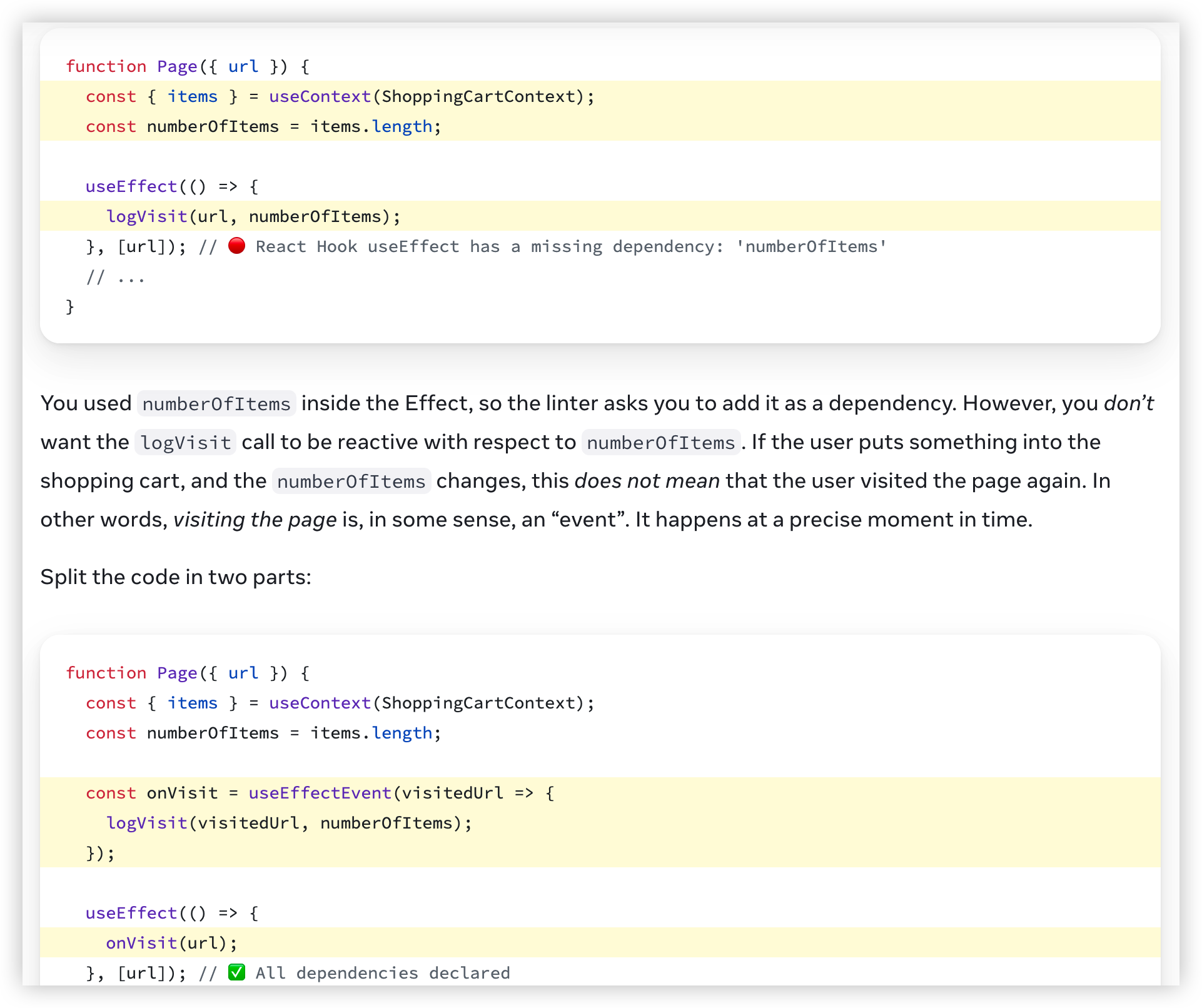
- 只想要帧最新值,不希望帧触发effect
- 事实上上面的写法也不会有问题,也是符合预期,但是对于lint和语义上都 远没有下面的明确。
下面解释了解决这个问题的函数的注意事项:
Limitations of Effect Events
Effect Events are very limited in how you can use them:
- Only call them from inside Effects.
- Never pass them to other components or Hooks.
这个倒是让人意外:这两个原则似乎我都经常违背。
给了一个例子还是比较明确的。
这个主要和实现的方式有关系:TODO:这个可能需要你去试一下,这个函数到底会变化吗?
removing-effect-dependencies
简直就是灾难,这里提到了非常多常用的业务场景,都触发了UseEffect的狗屎设计。也是上面useEffectEvent的有效场景补充。
这里的例子都值得好好品一品,针对每一个例子应该怎么处理更好,都有解决的答案。